

Table of Contents
Best Practices
- Multi-threaded processing: Enable to get the fastest performance possible:
- Navigate to File --> Options -- Advanced.
- Check "Enable multi-threaded calculation." Set number of processors as high as possible.
- Formula calculation settings: Set to "Partial" to significantly improve performance.
- Navigate to "Formulas" via Excel ribbon --> Click on "Calculation Options" dropdown.
- Select "Partial." If you complete a sensitivity table, use the "Calculate Now" or "Calculate Sheet" buttons instead.
- Sheet protection: Navigate to "Review" via Excel ribbon and click on "Unprotect Sheet" (no password required).
- Sheets are protected by default since you only need to edit input cells (which are already unprotected).
- Sheets cannot be unprotected on the Basic version (upgrade to Professional or Developer).
- The COVER tab cannot be unprotected on any version.
- Freeze/unfreeze panes: Freezing panes improves navigation and makes analysis more efficient.
- Select cell to freeze. May require unprotecting the sheet (not possible on Basic version). You'd typically freeze the cell at the top-left intersection between fiscal years and row labels.
- Navigate to "View" via Excel ribbon and click on "Freeze Panes," then select appropriate option.
- Gridlines, headings, and formula bar: Hiding these gives spreadsheet a clean, more professional look.
- Navigate to "View" via Excel ribbon. Look under the "Show" group.
- Uncheck "Gridlines," "Headings," and "Formula Bar." Gridlines and Headings are per-sheet settings, so repeat for every tab.
- Inconsistent formula warnings: Removes the green triangle indicators on cells with non-uniform formulas.
- Navigate to File --> Options --> Formulas.
- Under "Error Checking Rules" uncheck "Formulas inconsistent with other formulas in the region."
- Format stale values: Removes strikethrough format on cells waiting to recalculate.
- Navigate to "Formulas" via Excel ribbon --> Click on "Calculation Options" dropdown.
- Uncheck "Format Stale Values."
Debugging Tips
- Slow data loading: Follow these steps if data is loading slowly:
- Click on the appropriate refresh button on the Wisesheets add-in panel.
- Delete and re-input stock ticker. Ensure ticker is supported on Yahoo Finance and is not an ETF/Fund.
- Save and restart Excel.
- Check/restart your internet connection.
- Macros error: You MUST enable Excel VBA macros. Otherwise, themes, show/hide options, and charts will not work.
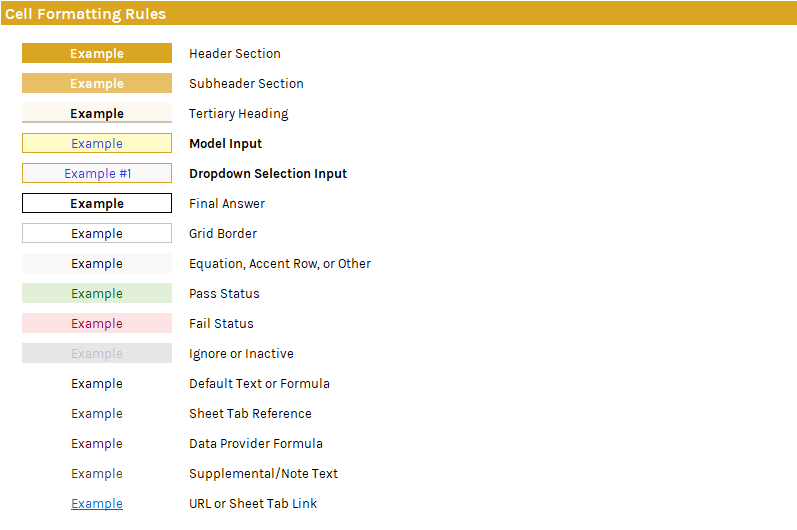
Cell Formatting Rules
Here are the cell formatting rules to know when navigating the spreadsheet:
Shortcut References
Here's a cleaned list of the available shortcut names and their respective reference cells: